Property Registration Process in Telangana: Step by Step
How to register a flat, house or plot in Telangana: documents, online data entry, paying the charges, slot booking, the Sub-Registrar visit, and what to do after.
Jameendar Editorial · · 8 min read

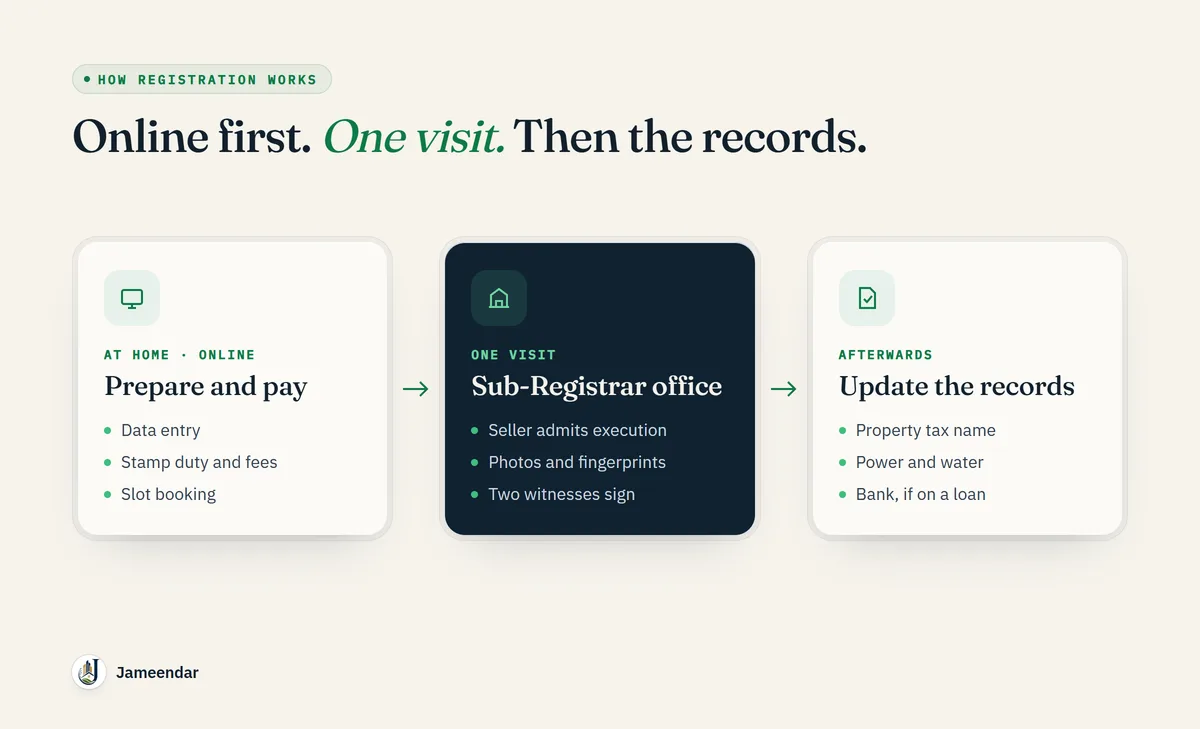
In Telangana, ownership of a flat, house or plot passes when the sale deed is registered at the Sub-Registrar office, not when the price is paid or the keys are handed over. Registration is mostly online now: you enter the details on the government portal, pay the charges, book a time slot, and then visit the Sub-Registrar once with the seller and witnesses.
This guide walks through the process for non-agricultural property, in the order you will do it, using the Telangana Registration and Stamps Department's own procedures. Agricultural land follows a different route, covered near the end.
Before you start: three things to settle
1. The title is verified. The registration office registers the document you present. It does not check whether the seller actually owns what they are selling. The department's own guidance says the responsibility for verifying title, ownership and possession lies with the buyer. Finish the title check and Encumbrance Certificate before you pay anything for registration.
2. You know the cost. A sale deed costs 7.5% of the agreed price or the government market value, whichever is higher. Our guide to stamp duty and registration charges in Telangana has the split and worked examples.
3. The property is not restricted. Registration of government, assigned, endowment and Wakf land, and other properties on the prohibited list, is barred. Check the Section 22-A status for the survey number first.
Step 1: Collect the documents
For a typical sale of a flat, house or plot, keep these ready:
| Document | Why it is needed |
|---|---|
| The draft sale deed | The document being registered |
| Seller's link documents (previous sale deeds) | To show how the seller acquired the property |
| Property tax receipt and assessment number (PTIN), or the local body's property ID | To identify the property in municipal records |
| Encumbrance Certificate | Your proof of the transaction history; not collected by the office, but you need it |
| Identity and address proof for buyer, seller and both witnesses | Aadhaar, passport, driving licence or similar |
| PAN of buyer and seller | Required for property transactions above ₹10 lakh (Form 60 if a party has no PAN) |
| Passport-size photographs of buyer and seller | For the photograph and fingerprint form under Section 32A |
| Route map / sketch of the property | Required with documents affecting immovable property |
If anyone signs through a Power of Attorney, carry the original POA as well, and read our guide on checking seller ownership first. The department specifically warns about forged powers of attorney, including fabricated ones claimed to be from NRI owners.
Step 2: Get the sale deed drafted correctly
The deed must describe the property so precisely that it cannot be confused with another: survey or plot number, extent, door number, the four boundaries, and the village, mandal and district.
The department's advice is to name the actual owners of the neighbouring properties rather than writing vague boundaries such as "neighbour's land". Spellings, ages and addresses must match the parties' ID documents exactly. Mistakes here cause mutation problems later and mean extra trips to the office for corrections.
Step 3: Enter the details on the registration portal
Registration starts online at the Telangana registration portal, in what the department calls pre-registration or public data entry:
- Create a login on the portal.
- Choose the document type (sale deed) and the Sub-Registrar office that covers the property.
- Enter the details of the seller, the buyer, the witnesses and the property, and upload the required documents.
- The portal calculates the stamp duty, transfer duty and registration fee from the value you enter, or from the market value if that is higher.
The department also asks for location tagging of the property through its T-Registration mobile app, so the map position is captured with the record.
Step 4: Pay the stamp duty and fees
Pay the charges calculated by the portal, either through a challan generated during data entry or through e-stamps. Keep the challan number and the payment receipt: the slot booking is linked to the payment.
If you are buying for ₹50 lakh or more, there is a separate tax step that is easy to miss. The buyer must deduct 1% TDS from the price and deposit it with the Income Tax Department in the seller's name. Since April 2026 this is filed under the new Income-tax Act, 2025, on Form 141, which replaced Form 26QB. Ask your CA to confirm it before the registration day.
Step 5: Book a slot at the Sub-Registrar office
Once the payment is done, book a time slot for the visit. The portal lets you choose a date and time, and to cancel or reschedule if needed.
Book a slot only when everyone who needs to attend can be there. If the seller does not turn up, the document cannot be registered.
Step 6: Visit the Sub-Registrar office
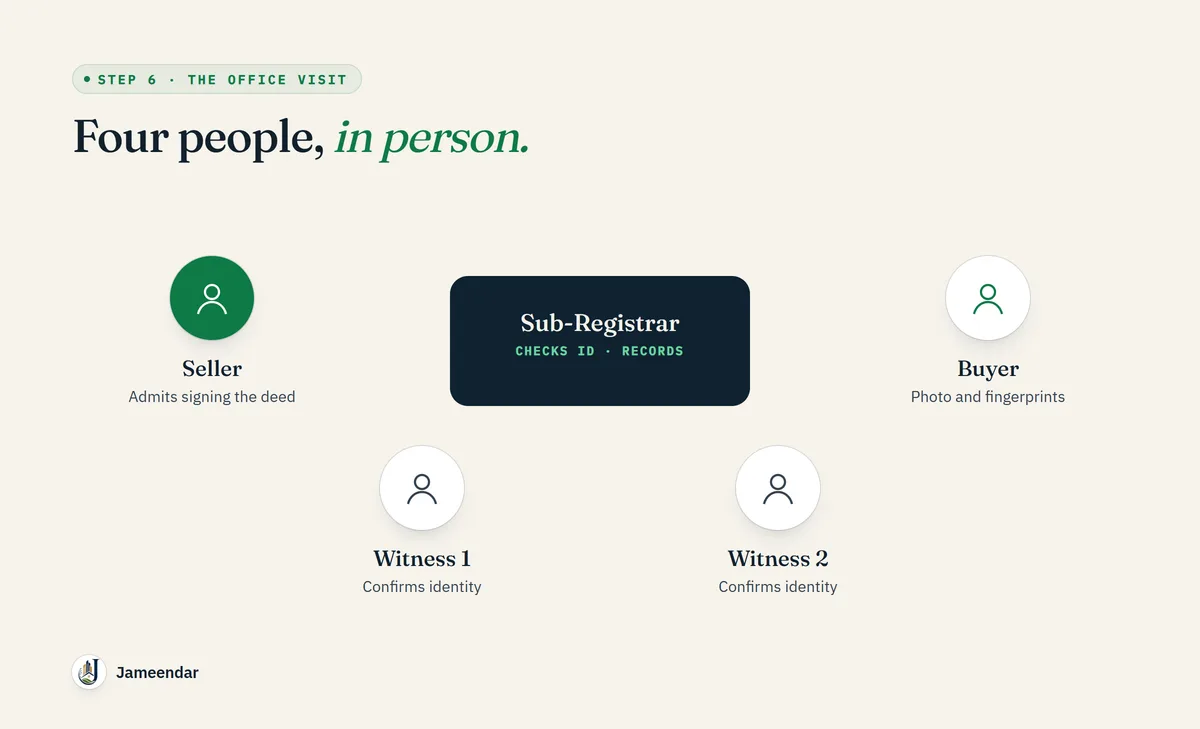
On the booked date, the seller, the buyer and two witnesses go to the Sub-Registrar office. Offices generally work from 10:30 am to 5 pm.
At the office:
- The officer checks the document and the identity of each party.
- The seller admits the execution of the deed in front of the officer. This is the legal heart of registration.
- Photographs and fingerprints of the buyer and seller are taken for the Section 32A record.
- The two witnesses sign to confirm the identity of the parties. Any adult who is not a party to the document can be a witness, but without them the officer can refuse registration.
If the document has blanks, erasures or alterations, the parties must initial each one.
Step 7: Collect the registered document
After registration, the document is scanned and the original is returned with the registration endorsement. Check it immediately for errors in names, the property description and the amount. Get a certified copy later from the portal if you need one.
Step 8: Finish the work after registration
Registration makes you the owner, but other records still show the seller until they are updated:
- Property tax and municipal records: apply to GHMC or your municipality to transfer the property tax assessment to your name.
- Electricity, water and the housing society: transfer the connections and your society membership.
- Your bank: if you took a home loan, the original documents go to the bank and a mortgage (deposit of title deeds) is created.
Keep scans of every document, receipt and challan together. A store like Jameendar Vault keeps them in one place.
Time limits that matter
- A document must be presented for registration within four months of signing.
- After four months, the District Registrar can allow it within a further four months, with a penalty of up to ten times the registration fee. After eight months it cannot be registered at all.
- For a document signed outside India, the four months run from the date it first arrives in India.
- Wills are the exception: they can be registered at any time.
Agricultural land is different
Agricultural land is not registered at the Sub-Registrar office. It is registered through Bhu Bharati at the Tahsildar's office, where the Tahsildar acts as the joint sub-registrar and the land record is updated at the same time. The pattadar passbooks must be produced. Our guide to Dharani and Bhu Bharati mutation explains how that record works.
Common mistakes
Paying for registration before verification. The office does not verify title. Once the stamp duty is paid and the deed registered, undoing a bad purchase is slow and expensive.
A vague property description. "Plot next to Mr. X's land" causes disputes and mutation errors. Use survey numbers, extent and named neighbours.
Booking a slot the seller cannot attend. Without the seller's admission of execution, there is no registration.
Missing the TDS step on purchases of ₹50 lakh or more. It is the buyer's responsibility, and the penalties fall on the buyer.
Stopping at registration. Without updating property tax and other records, the seller's name stays on bills and you may face problems when you sell.
FAQs
How long does property registration take in Telangana?
The visit to the Sub-Registrar office usually takes an hour or two once the data entry, payment and slot booking are done. The online steps can be completed in a day if the documents are ready.
Can I register a property in Telangana without going to the office?
No. The data entry and payment are online, but the seller, buyer and two witnesses must appear at the Sub-Registrar office for the seller to admit execution and for photographs and fingerprints to be taken.
Who needs to be present at property registration?
The seller (or their authorised agent), the buyer and two identifying witnesses.
What happens if I register the sale deed late?
Within four months of signing there is no penalty. Between four and eight months the District Registrar can allow registration with a penalty of up to ten times the registration fee. After eight months the document cannot be registered.
Does registration prove the seller had a valid title?
No. The office registers the document presented to it. Verifying the title is the buyer's responsibility.
Where do I register agricultural land in Telangana?
Through Bhu Bharati at the Tahsildar's office, not at the Sub-Registrar office.
Final takeaway
Verify first, then register: settle the title, the restrictions and the cost, draft the deed precisely, complete the online entry and payment, and attend the Sub-Registrar office with the seller and two witnesses. Then update the property tax and other records so the purchase is complete everywhere, not just in the registration office.
Sources
- Telangana Registration and Stamps Department: Registration procedure, Registration FAQs, Slot Booking Advisory and Property Transaction Advisory (downloads section of the portal).
- Income-tax Act, 2025: TDS on purchase of immovable property (1% at ₹50 lakh and above; Form 141 from 1 April 2026).
Procedures change from time to time. Confirm the current steps on the official portal before you start.